
I Tried to Build a Page Builder That Writes Real Themes. Here's the Wall I Hit.
A canvas and real code cannot both be the source of truth. I learned that the hard way building a page builder that generates real themes; others had the same idea and met the same wall. Here's the mismatch explained in plain language, and what it means for the tools you're comparing right now.
The Obvious Idea
Years ago, I wanted to build the obvious product.
A WordPress page builder that generates real themes. You drag sections around on a canvas, and behind the scenes it writes clean, honest theme code. Code you could open in any editor. Code you could take anywhere.
Visual editing and real code. The best of both worlds. No lock-in.
Every developer who has spent time in the WordPress world has had this exact idea. I was sure I'd just be the one to actually do it.
And I wasn't a beginner who didn't know better. I've spent over 21 years writing software professionally, and I was a long way into that career when this idea got hold of me. I knew about parsers, code generation, edge cases. I'd seen tools fail at this before, and I had an explanation ready for every failure: wrong architecture, wrong team, wrong decade. With modern tooling and enough care, surely it was doable.
I hit a wall instead.
And here's the thing I learned afterwards: I wasn't the first. Others had the same idea before me, built their version of it, and ran into the same wall. Not because they weren't smart enough. Because the wall is built into what code and canvases are. All those years of experience didn't help me, because experience helps you climb hills faster. It does nothing against a horizon.
This post explains that wall in plain language. If you're comparing tools right now, whether classic builders, AI site generators, or anything promising visual editing on top of real code, this is the one piece of theory that makes all of their trade-offs suddenly make sense.
One thing before we start. You're reading this on the blog of a product I built, and this story ends with it. I won't pretend otherwise. But the wall is real whether or not you ever touch PhantomWP, and the test this post ends with works on my product exactly the way it works on everyone else's.
The First Demo Always Works
Here's how my prototype went. And once you've lived it, you start recognizing the same arc in other tools' demos.
You drag a hero section onto the canvas. The tool generates a tidy chunk of code. You look at the code. It's clean. It's exactly what you would have written.
Magic. Ship it.
These demos live in this moment. Drag, generate, admire the code. The demo is real; nothing is faked. The wall is just further down the road, and demos never drive that far.
You probably know the pattern from every piece of software ever made: the first 80% gets built in a sprint, and the last 20% takes years. That's normal. That's just edge cases and real users showing up. But it's also a hill: slow, painful, and climbable if you keep grinding.
This is not that. A builder that promises to understand real code isn't climbing a hill, it's walking toward a horizon. Every new code pattern you teach the canvas costs more effort than the last one and covers less of what people actually write, and the supply of patterns never runs out, because people can always write new ones. There's no "last 20%." There's no percentage at all, because the thing being chased has no edge.
That's why I believed in my prototype for as long as I did. Early progress was genuinely fast, and fast early progress feels like proof the rest will follow. It's also why tools with this same promise keep appearing, demoing brilliantly, and going quiet about the hard parts later. The founders aren't lying in the demo. They just haven't reached the horizon yet.
Then You Touch the Code
The wall appeared the first time I did the natural next thing: I opened the generated theme and edited it by hand.
Small stuff. I renamed a class. Moved some markup around. Added a bit of PHP to pull in related posts.
Then I opened the builder again.
The canvas had no idea what I was looking at. My hand-edited section either showed up broken, or showed up wrong, or didn't show up at all. And if I dragged anything, the builder would happily regenerate the file, steamrolling my edits.
My "best of both worlds" tool had quietly become a one-way street: the builder could write code, but it couldn't truly read it back.
I assumed I had a bug. I didn't. I had physics.
The Parts-List Problem
Here's the first half of the wall, as an analogy.
A visual canvas is like a LEGO kit. It comes with a parts list: headings, images, buttons, columns, sections. Every part has a known shape and known settings. That's why the canvas works: it can draw anything made of parts it recognizes, and it can show you knobs and handles for each one.
Code is not a kit. Code is the infinite bin of bricks, plus a workshop where you can melt bricks down and make shapes nobody has ever seen.
The canvas can only ever display and edit things from its parts list. The moment your code does something that isn't on the list, the canvas has nothing to draw. Not "doesn't draw it well." Has nothing to draw.
And real code goes off the parts list almost immediately. Here's the simplest example, the one that killed my prototype.
The Loop Problem
Say your shop page shows a card for every product.
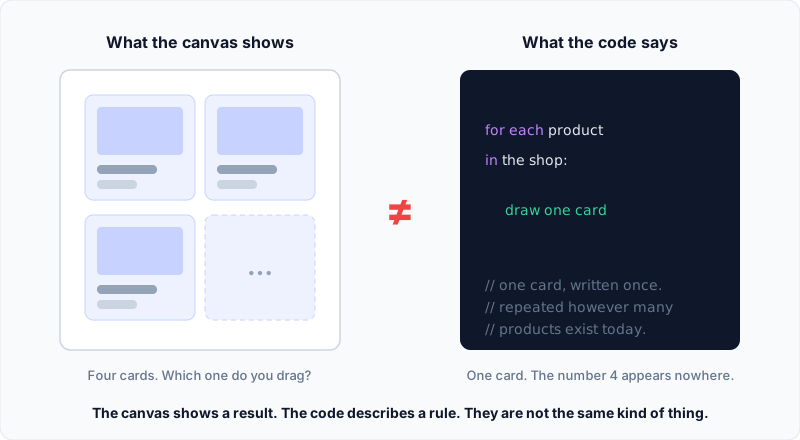
The canvas shows you four product cards, because you happen to have four products today.
The code says something completely different. It says: "for each product in the shop, draw one card." One card, written once. The number four appears nowhere.
Now drag one of those four cards somewhere else on the canvas.
What should the tool do to the code? There is no "card number two" in the code to move. There's one rule. Did you mean to move all the cards? Reorder the products in the database? Make card two a special case, breaking the rule into pieces?
The canvas shows a result. The code describes a rule. They're different kinds of things, and there's no general way to turn an edit on a result back into the right edit on the rule.
Loops are just the first place this bites. Conditions ("show this banner only on sale days"), data that arrives when the page loads, logic of any kind: none of it has a shape you can drag, because the shape doesn't exist until the code runs.
The Round Trip Is Never Free
There's a second, sneakier half of the wall.
Even when your code stays perfectly on the parts list, even when the builder can understand every bit of it, reading code in and writing it back out is like translating a poem into another language and back.
You get the words back. You don't get the poem.
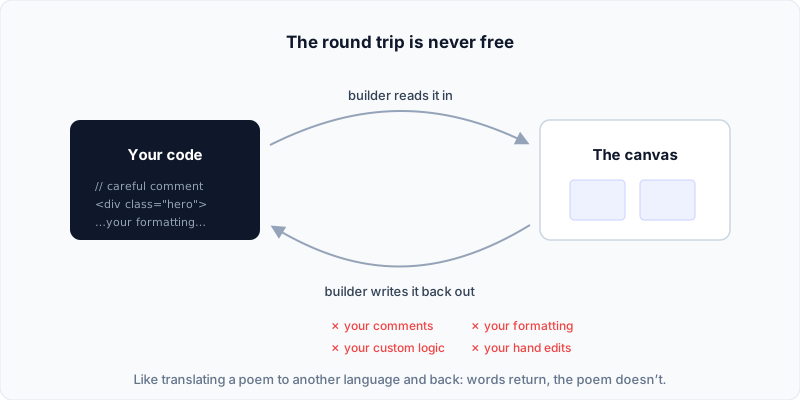
Your formatting, your comments, the way you organized things so future-you could understand them: the canvas doesn't store any of that, so it can't write any of it back. Every trip through the canvas sands your fingerprints off the code.
If you've ever opened a file after a tool "helpfully" regenerated it and felt like a stranger rearranged your house, that's this.
The Fork in the Road
Sooner or later, anyone who builds one of these tools arrives at the same fork. I did:
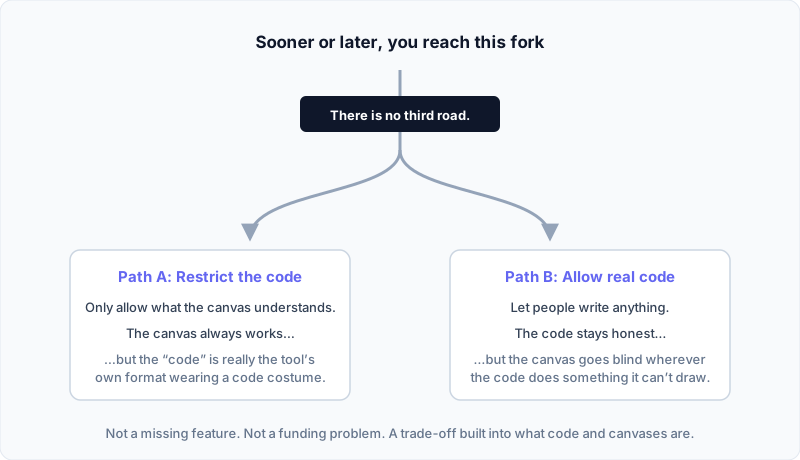
Path A: Restrict the code. Only allow what's on the parts list. Now the canvas works flawlessly forever. But be honest about what happened: the "code" isn't really code anymore. It's the tool's own internal format wearing a code costume. It looks like code in the export. It is actually a save file.
Path B: Allow real code. Let people write anything. Now the code stays honest and yours, but the canvas goes blind wherever the code does something it can't draw. The tool has to either refuse those files, show a gray "can't preview this" box, or fake it and steamroll your edits.
There is no third road. This isn't a missing feature, and it isn't something the next funding round fixes. You cannot make a parts list that contains the infinite bin.
The honest comparison is a perpetual motion machine. Every few years an inventor announces one, and the demo genuinely spins: wheels turn, magnets click, the room applauds. It spins because the demo hasn't run long enough for physics to collect. The US patent office eventually got so tired of these that perpetual motion machines are the one invention the law specifically allows examiners to demand a working model for. "A canvas that fully understands real code" deserves the same policy: don't read the marketing page; demand the working model. (We'll get to the five-minute test at the end.)
And here's the part you've already lived, even if you didn't know why. If you've spent time in any serious visual tool, you've hit the weird little rules. This element can't go inside that one. You can't put a dynamic list inside a component. That slot can't contain this kind of block. Those rules feel arbitrary, as if the developers just didn't get around to it. They're not arbitrary. Each one marks an exact spot where the canvas would have to understand a rule instead of drawing a result. The restrictions aren't unfinished features. They're the wall, fenced off politely.
Almost every tool you've heard of lives on Path A and doesn't advertise it. WordPress's own block editor is Path A done openly: your blocks are saved as the editor's own format. Look at any post's source; that's what those <!-- wp: --> comments are. It works because it never pretends your content is free-form code.
And credit where it's due: some builders know exactly where the wall is and stay on their side of the fence with dignity. They call themselves visual builders, they never promise you real code, and they put their effort into making the save file a good save file. That's an honest deal, and for a lot of people it's the right one. There is nothing wrong with Path A. There's only something wrong with selling Path A in a Path B costume.
Old-timers will remember Dreamweaver and its famous promise from the late 90s: "round-trip HTML." Edit visually or edit the markup, and nothing breaks. For static pages it held up surprisingly well, and the reason is the exception that proves the rule: plain HTML has no loops, no conditions, no logic. It's all parts list. The promise fell apart exactly where this post says it must: the moment scripts, templates, and server code entered the page.
And those AI tools that generate a site and let you "view the code"? That's Path A with a window. The code you're looking at is exhaust from their machine. Copy it and leave, and you have a snapshot; the machine that produces it stays behind. I've written more about how builder abstraction compares to AI-generated code if you want to go deeper on that one.
Has Anyone Survived on Path B?
A fair question at this point: has anyone made Path B actually work?
Yes. Not many, and the survivors share one habit: they accept the blindness instead of faking sight.
The clearest example is Pinegrow. It opens real HTML, CSS, and PHP files, straight from your disk. It gives you visual tools for everything it understands, and it leaves everything else exactly as you wrote it. Edit a file by hand in a different editor, and nothing breaks; the file is the truth, and Pinegrow simply reads it again. In the WordPress world it goes all the way: you can visually build a real WordPress theme, and what comes out is plain PHP that keeps working with Pinegrow uninstalled. That's the disappearing test, passed. Run the five-minute test from the end of this post against it, and it passes that too.
Notice what Pinegrow never promises: a canvas that understands everything. Where your code does something it can't draw, you see code.
Ask around and you'll hear two things about Pinegrow: respect for what it does, and complaints that it feels complicated. Both are fair, and the second one is not an accident. This is what the honest side of the fork costs. A tool that refuses to hide the real project will always feel heavier than one that shows you a comfortable save file, because the complexity was never the tool's invention. It was always there. Path A hides it until the day you try to leave; Path B shows it to you on day one.
So Path B can work; Pinegrow proved that for classic WordPress themes. But it also left the hard question on this side of the fork unanswered: if you hand people the real project, how do you keep it from feeling like a tool only developers could love?
That open question is the one I ended up building around, for a different stack: Astro and headless WordPress. And the reason a better answer exists today than in Pinegrow's early days is AI: something that can read and write the real code on your behalf, while you watch every change it makes.
What I Did About It
I stopped trying to build the impossible tool. That's the honest version of PhantomWP's origin story: it exists because the page builder I actually wanted to build can't exist.
So PhantomWP refuses to put a canvas between you and your project. The real project, the source of truth, is plain files, in a Git repository, in your GitHub account. Real code, Path B, all the way down.
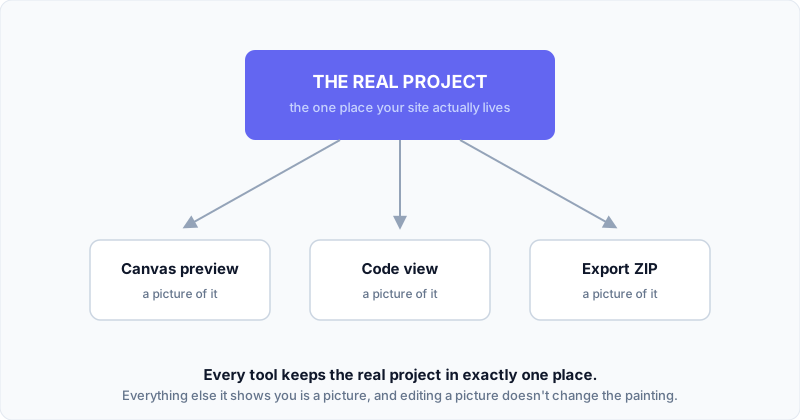
The visual tools sit on top of the files, not in between you and them. They help you navigate the project, see the structure, work with sections and components, and watch what AI changes through Git: branches, diffs, history, rollbacks. And where the code does something a visual tool can't represent, the tool doesn't fake it. The code is right there. You read the rule instead of a picture of one result.
Is that a trade-off? Of course it is. That's the entire point of this post: everyone at this fork makes a trade-off. The only difference between tools is which path they picked, and whether they tell you.
The One Question to Ask Any Tool
You don't need to remember the theory. You need one test, and you can run it during any free trial:
Edit one file by hand, outside the tool. Then go back to the visual editor.
- If the tool won't let you touch the files at all, it's Path A. The "code" is a costume. That can be fine! Just know you're buying a save file, not a project.
- If the tool let you edit, but then broke, ignored your change, or overwrote it, it's Path A pretending to be Path B. Be careful with this one.
- If the tool shows you honestly what it can and can't represent, and your edit survives, it's Path B. The code is really yours.
And yes, that includes PhantomWP. Run the test on us. The product is built around passing it, and if a hand edit of yours ever gets steamrolled by one of our visual tools, that's a bug, and I want to hear about it.
No marketing page will answer this for you. Five minutes with the trial will.
The wall is real, it's old, and nobody gets to climb over it. Not me, not anyone. The only thing a tool can do is pick a side and be honest about it. Now you know how to check.