Build it with AI.
Fine-tune it visually.
Let AI build the first version, then click and change what you want, faster than another prompt. Keep your content in WordPress or any other CMS, without lock-in.
- A bird’s-eye view of every page
- Own your code and GitHub repo
- Deploy to your own hosting
One payment. Every future update included. 30-day money-back guarantee.


Over 1,000 projects created using PhantomStudio
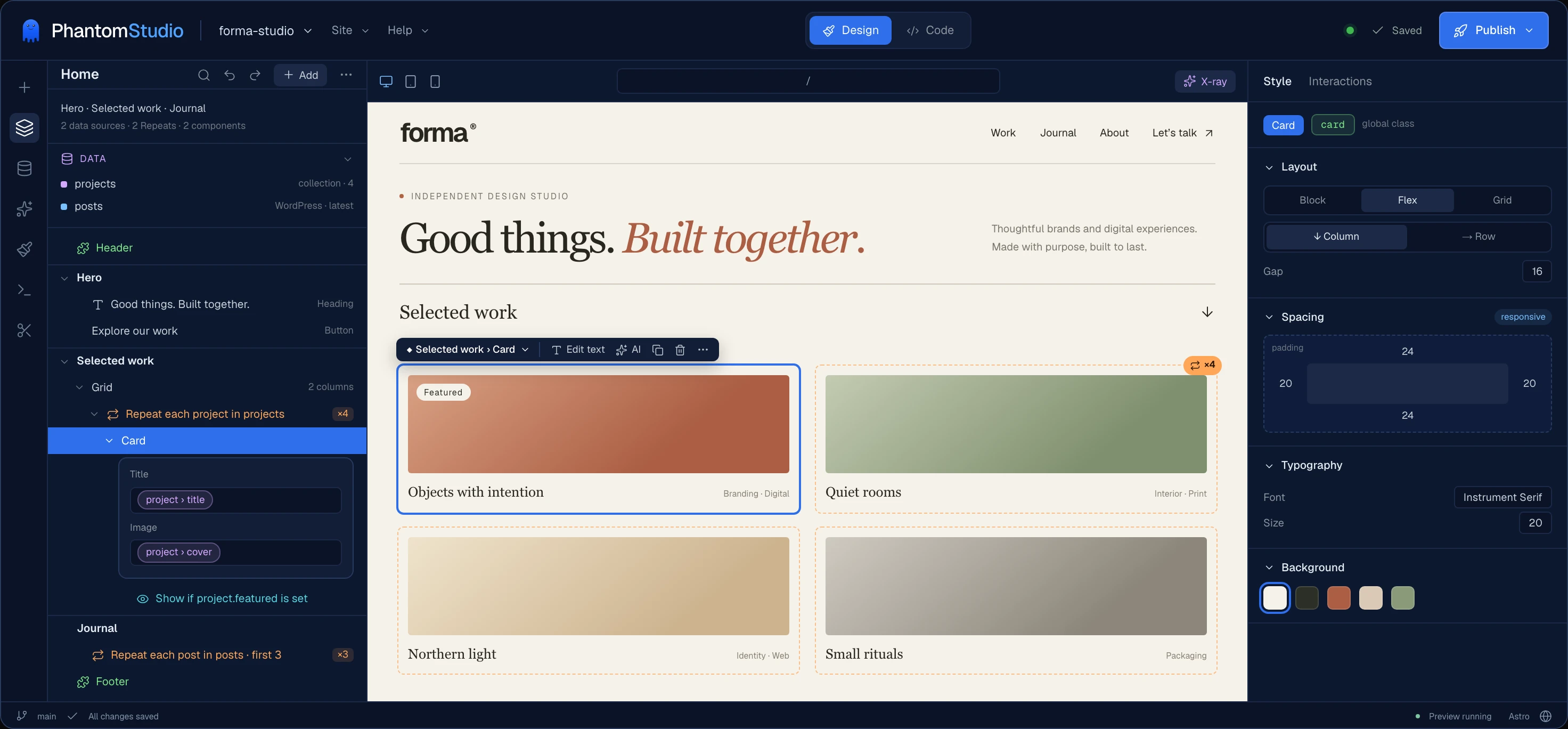
- See what AI builtEvery page: data, components, live or built once.
- Any content sourceWordPress, Sanity, files.
- WooCommerce BetaHeadless storefronts in Astro.
- One-click deployFrom localhost to live.
Used by WordPress developers and agencies
Going headless
“Tasks that normally require custom wiring and workarounds are handled through a clean, intuitive interface. It removes friction from what is usually a very technical process.”

Adam Lowe
President, Peak Performance Digital
Performance
“The level of performance is simply unbelievable.”

Lincoln Cristiano
Founder, Digital Forms
Client projects
“This is the solution I was waiting for, for my agency clients.”

Cyril Ordines
Director, Beeween.com
Keep your content where it is. Build the site you want.
Your content can come from a CMS your clients already know, or live right in the project. The site is an Astro project, built visually from ordinary components and committed to your GitHub repo.
Your content
- A CMS: WordPress, Sanity, or WooCommerce products
- Content collections and JSON or CSV files in the project
- The editing workflow you and your clients already know
Your site
- Pages built visually, from ordinary Astro components
- Code in your own GitHub repo
- Fast static pages, or dynamic where you need it
Coming from WordPress? Themes and frontend plugin output don't transfer automatically. Build those experiences in Astro, with the optional connector for forms, users, and WooCommerce storefronts (beta).
Your content stays where it is. Your site becomes an Astro project you own.
Your development workspace
From an idea
to a live site.
PhantomStudio brings project setup, Git, a browser editor, and deployment into one workspace, so you can concentrate on building the site.
Creates a real Astro project
Generate a starter with ordinary Astro pages, components, and configuration files.
Connects your GitHub repo
Keep the project in your own GitHub account, with commits and branches you can review.
Gives you a visual builder and a code editor
Build in Design mode with layers, a live preview and a Style panel, or switch to Code mode. Both edit the same files.
Lets AI work directly on your code
Ask for a component or a change. Inspect the files AI edits and keep working on them yourself.
Connects your content when you are ready
Use WordPress, Sanity, WooCommerce, content collections or data files, all listed in one Data tab.
Start with a working project. Keep building on a normal Astro codebase.
From project to deployment
Connect your repo, build the site, and choose where to deploy it. Bring in content from a CMS when the project needs it.
Connect GitHub
Connect your GitHub account. PhantomStudio creates the project repository under your account, where you can clone it and continue working independently.
Create an Astro project
Pick an Astro starter. We scaffold the codebase, push it to a fresh GitHub repo, and open the browser workspace ready to edit.
Connect your content
Connect WordPress, Sanity or WooCommerce, or keep content in the project as collections and data files. You can also start with no CMS at all.
Deploy to Vercel or Cloudflare
Use the built-in deployment workflow, or clone your repo and configure another host that supports your Astro project.
Your project stays in GitHub. You can keep building outside PhantomStudio whenever you want.
Features
Everything you need to ship the site
The tools you would otherwise wire up yourself, already working together on a normal Astro project.
Git built in
Commit and push from the workspace, work on draft branches, and resolve conflicts with a guided resolver and automatic recovery copies.
SEO and fast images
Titles, descriptions and share images per page, a sitemap, robots.txt and a go-live check. Images are served as responsive WebP with blur-up placeholders.
Visual builder
A layers panel, live preview and Style panel. Repeat lists, show things only when data is there, and bind content without writing code.
Static by default, dynamic when needed
Pages are built ahead of time and served as fast static HTML. Make a page dynamic for search or accounts, cache it for a few minutes, or make one component interactive.
Site Style
Set colors, typography, and layout tokens once, with font and icon managers to match.
Components and menus
Start from ready-made sections and component kits, turn anything into a reusable component, and build menus visually.
Forms and visitor accounts
Deliver forms through Formspree, Web3Forms, or the WordPress connector, and add visitor login and registration.
One-click deploys
Deploy to Vercel or Cloudflare Workers, preview before you publish, and roll back any deployment.
Optional AI assistant
Agent, Plan, and Ask modes that edit your real project files, using your own API key.
AI works better when it has structure.
AI is more useful when it can work with ordinary files, components, and project structure. In PhantomStudio, AI edits the same Astro project you can open, inspect, and continue building yourself.
Real files
AI edits normal .astro, JavaScript, CSS, and configuration files.
Review every change
Inspect the code and use Git to restore previously committed versions.
Bring your own model
Use Claude, OpenAI, Gemini, OpenRouter, or an OpenAI-compatible endpoint.
Bring your own AI key
Choose the model provider that fits your workflow.
Use OpenAI, Anthropic, Google Gemini, OpenRouter, or any OpenAI-compatible endpoint. PhantomStudio gives the assistant structure; you choose the model provider.
Connect content, users, and frontend actions
Read public WordPress content through the REST API. Add the optional plugin when your frontend needs to create content, sign users in, or send data back to WordPress.
Let AI work with WordPress
Ask for a Recipes custom post type, a new draft blog post, or a Testimonials taxonomy. The AI creates it directly in your WordPress through the plugin.
Build logged-in experiences
Build login, registration, and account pages in Astro using your WordPress users.
Safely send data both ways
Connect forms, account actions, and frontend interactions to WordPress through authenticated requests.
Keep WooCommerce. Own the storefront.
Products, customers, and orders stay in WooCommerce. Your storefront lives in your own Astro project and GitHub repository, with the store admin kept out of public view.
- Product catalogProducts, categories, and product pages
- CartAdd, update, and remove items
- CheckoutBank transfer, Stripe, or PayPal, with WooCommerce totals
- Customer accountsLogin, order history, and saved addresses
- Coupons and shippingCalculated by WooCommerce at checkout
- SearchFind products by name, description, or SKU


Built for developers, freelancers, and small agencies
Use your existing web development skills to build client sites, with content from the CMS your clients already use, or none at all.
Good fit
- Developers who want to work directly with Astro components and their own repo
- Agencies that need a repeatable, fast workflow for client sites
- Freelancers who want code, visual tools, and optional AI in one workspace
Plan for
- Rebuilding the design - an existing theme (WordPress or other) does not convert automatically
- Web fundamentals - HTML and CSS knowledge helps you review and customize the output
- Service costs - hosting and AI provider usage are separate from your license
You don't have to rebuild overnight.
Keep your current site running, on WordPress or anything else, while you build the new one alongside it. Test the content, forms, and integrations before switching traffic over.
Your Astro workflow, already connected
You can assemble this workflow yourself. PhantomStudio brings the setup and tools together while leaving the code in your hands.
| DIY Astro | PhantomStudio | |
|---|---|---|
| Astro project setup | Set up yourself | Generated for you |
| GitHub repository | Connect separately | Created in your account |
| Browser workspace | Configure separately | Included in the workflow |
| Visual builder | Not included | Built in, on your real code |
| CMS and data integration | Choose and configure | WordPress, Sanity, files built in |
| WooCommerce storefront | Build cart and checkout yourself | Built in (beta) |
| AI project context | Configure separately | Built in; bring your API key |
| Deployment workflow | Configure separately | Vercel and Cloudflare built in |
| Code and repo ownership | Yours | Yours |
Get PhantomStudio with lifetime access
One payment. Unlimited projects. All future PhantomStudio updates. Build your next client site with a workflow you own.




Starter
Coming soonFor your own sites: everything in PhantomStudio, on up to 3 projects. Billed every year.
What you get
- 3 projects
- Renews every year at $149
- Visual builder with Design and Code modes
- AI agent (Agent, Plan, Ask) with your own API key (Claude, OpenAI, Gemini…)
- Content from WordPress, Sanity, collections and files
- Version control with draft branches and rollback
- Deploy to Vercel or Cloudflare Workers
Lifetime Access
Checking availabilityEverything in PhantomStudio, on unlimited projects, with every future update. Pay once.
What you get
- Unlimited projects, including client sites
- All future updates included, forever
- Visual builder with Design and Code modes
- AI agent (Agent, Plan, Ask) with your own API key (Claude, OpenAI, Gemini…)
- Content from WordPress, Sanity, collections and files
- Version control with draft branches and rollback
- Deploy to Vercel or Cloudflare Workers
- Headless WooCommerce storefronts (beta)
- Priority support
30-day money-back guarantee
You can enter your VAT number in checkout after selecting your country and entering your email.
Agency
Coming soonFor freelancers and agencies: everything in PhantomStudio, on up to 100 client projects. Billed every year.
What you get
- 100 projects
- Renews every year at $399
- Visual builder with Design and Code modes
- AI agent (Agent, Plan, Ask) with your own API key (Claude, OpenAI, Gemini…)
- Content from WordPress, Sanity, collections and files
- Version control with draft branches and rollback
- Deploy to Vercel or Cloudflare Workers
- Headless WooCommerce storefronts (beta)
- Priority support
“The level of performance is simply unbelievable”Lincoln Cristiano, Founder at Digital Forms
Included in your lifetime license
Recently shipped
- Headless WooCommerce storefronts (beta)
- PhantomWP Connect WordPress plugin
- Deploys to Cloudflare Workers
Coming soon
- Headless Shopify integration
- SureCart integration
- Fluent Cart integration
More from our early users
“PhantomWP is a true game changer. If you run an agency and care about security and performance, you need to know PhantomWP -- it removes all the complexity of using WordPress + Astro and makes everything simple, stable, and incredibly fast. The level of performance is simply unbelievable.”
Lincoln Cristiano
Founder, Digital Forms
“I once watched a tutorial about fetching WordPress content to Astro via API, but the process seemed too time-consuming. Then I discovered PhantomWP. After reviewing the docs and a few video tutorials, I was impressed to find it handles most of the heavy lifting. That finally convinced me to go headless.”
Sharif Payenda
Mathematics Teacher
“PhantomWP impressed me with its blazing-fast performance and clean headless architecture that adds an extra layer of security. I especially love that it keeps WordPress as the backend, giving me the flexibility of a familiar CMS while delivering top-notch frontend speed and modern performance.”

Manikanta Srivishnu
Freelancer
“In SEO, web performance isn't optional. But turning WordPress into a clean headless stack used to take weeks. PhantomWP wipes all of that out. WordPress handles the CMS, Astro handles the front end, and the result is 99+ mobile Lighthouse with zero compromise. This is the solution I was waiting for, for my agency clients.”
Cyril Ordines
Director, Beeween.com
“PhantomWP is easily the most seamless way I've found to connect Astro with WordPress. Tasks that normally require custom wiring and workarounds are handled through a clean, intuitive interface. It removes friction from what is usually a very technical process.”
Adam Lowe
President, Peak Performance Digital
“The closest I've been to a frictionless headless WordPress + Astro setup. The AI assistant gets you unstuck fast, and Tailwind works exactly as-is -- no weird hacks. Even though it's still in beta, it already feels like it's heading in a really solid direction, and it's clearly built with production in mind.”
A.J.M.
WordPress educator
These quotes retain the product name used when they were shared.
Everything included
WordPress + Astro
- Pull posts, pages, and media from WordPress REST API
- Automatic SEO migration (Yoast, Rank Math, AIOSEO)
- Keep WordPress as your CMS, serve a modern Astro frontend
- Media sync and local image optimization
- WooCommerce storefront support (Beta) via the WordPress connector
Workflow & Version Control
- Version control with full commit history
- Draft branches: work in isolation, publish when ready
- Preview before publish and roll back any deployment
- One-click deploy to Vercel or Cloudflare Workers
- Theme Studio for colors, typography, and layout tokens
- Tailwind or plain CSS project generation
- Visual component library with Aurora, Landscaping, and Bakery kits
- Standard Astro project you can eject and self-host anytime
WordPress connector
- Self-pairing WordPress plugin (no API keys to copy)
- Use AI to create posts, custom post types, and taxonomies
- Visitor login, registration, and account flows on your Astro frontend
- Site-level form delivery via Formspree, Web3Forms, or Connect
- Authenticated requests between your frontend and WordPress
AI (optional)
- Chat-based editing: describe changes in plain English
- Agent, Plan, and Ask AI modes
- Bring your own API key; provider usage billed separately
- Use it when it helps, skip it when it doesn't
Frequently asked questions
Build it visually. Own every line.
Build your site visually, with AI, or directly in code. Keep it in your GitHub repo and deploy it on your own terms.